Web analytics without JavaScript
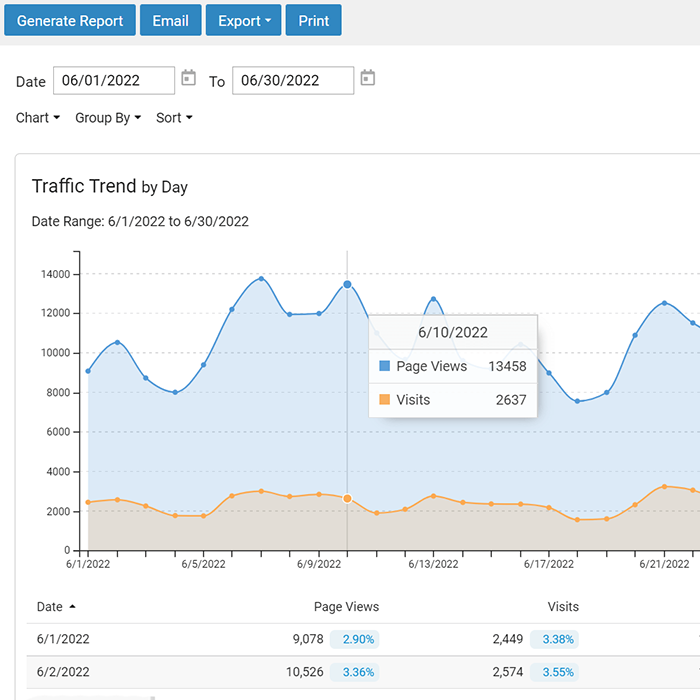
SmarterStats builds its reports from the logs your web server already writes. There's no tag to add to your pages and nothing for an ad blocker to stop, so every request is counted and your traffic data stays on your servers.
While script-based analytics products have their place, server-side analytics provide data that can be excluded from a script-based service due to policy, security, and browser restrictions.
How server-side analytics works
Every time a browser, bot or app requests a page, image or file, your web server writes a line to its log with the time, the address requested, the result code, the referring page and the browser or bot that asked. SmarterStats reads those logs, groups requests into visits and turns them into reports. Nothing runs in the visitor's browser.
- Your web server logs each request. SmarterStats reads the access logs IIS, Apache, nginx and Caddy write, so there's nothing to add to your pages.
- SmarterStats reads the logs. Point it at log folders on the same server, or read them over FTP, FTPS, UNC and Samba shares. With Enterprise, the Remote Service processes logs on each Windows or Linux web server.
- You get the reports. Traffic, visitors, referrers, pages, paths, bots and server errors, in a web interface you can open from any device.
What a tracking script can't count
Visitors who block scripts
Ad blockers and privacy extensions stop many tracking scripts from loading. Research shows strict blockers can hide 5% to 25% of visitors.
Visitors with JavaScript turned off
Some businesses disallow browsers from running JavaScript, and visitors with JavaScript turned off never show up as actual visits. Your web logs still track that visit.
Bots and crawlers
Google Analytics 4 removes known bots automatically and doesn't show how much traffic it removed. SmarterStats separates bots from people and reports on both.
Failed requests
A page that returns an error may never load the script that would have counted it. SmarterStats reports every result code, including server errors.
Direct downloads
When you link to a file on your website, whether a PDF or a document, that open is counted by your logs. JavaScript won't.
Where script-based tools fit
Scripts report on what happens inside the browser, such as clicks, scroll depth and screen size. If you need those details, a script-based tool can run beside SmarterStats as a complement. SmarterStats gives you the complete count of what your servers delivered, and keeps it on your own infrastructure.
Nothing added to your pages
No page weight
No scripts to contend with, no script for visitors to download, so nothing is added that may impact how quickly your pages load.
No security exceptions
No need to update your Content Security Policy, or add a third-party analytics service to your privacy policy or cookie notice, because your web logs never send data to a third-party domain.
Your data, your servers
Logs and reports stay on servers you control. Logs still record visitor IP addresses, so they fall under the same data policies as the rest of your server logs.
Works with the web servers you run
- IIS, from W3C Extended and IIS legacy logs, with site settings imported straight from IIS
- Apache and nginx, from CLF and Combined logs
- Caddy, from JSON lines logs
- Rotating logs and compressed .gz and .zip archives
SmarterStats runs on Windows Server 2016 or later with IIS and .NET Framework 4.8, and reads logs from Windows and Linux web servers.
Find the right fit
IIS log analyzer
Turn IIS logs into traffic, visitor, bot and server health reports on Windows Server.
IIS log analyzerGovernment and regulated sites
Web analytics for sites where third-party scripts aren't allowed, including intranets.
Government and regulatedHosting providers
Web statistics for up to 30,000 sites from one installation, with reports for each customer.
Hosting providers and ISPsFrequently asked questions
Does SmarterStats use cookies?
No. SmarterStats doesn't set cookies or run any code in the visitor's browser. It reads the logs your web server writes.
Are bots counted as visitors?
No. SmarterStats separates human visitors from spiders and bots, and reports on each.
Which web servers does it work with?
IIS, Apache, nginx and Caddy, from logs in W3C Extended, IIS legacy, CLF and Combined, and JSON lines format, including rotating logs and .gz and .zip archives.
Can I keep using Google Analytics?
Yes. Use the script-based tool for in-browser marketing data, and SmarterStats for complete traffic counts, bots and server health.
Is there a free version?
Yes. SmarterStats Free includes every report and tool for one website.