Intrusion Prevention and Detection Improvements
It’s no secret that spam, phishing attempts, brute-force attacks, and more have increased over the last year. Improvements in AI and related tools have made it easy for practically anyone to look for, and exploit, vulnerable servers. In the next release of SmarterMail, we’re enhancing the intrusion prevention tools included with SmarterMail to help administrators prevent these types of attacks from impacting users. These changes make SmarterMail’s IDS both more powerful and more flexible, while reducing the likelihood of legitimate users being locked out of their email accounts.
It’s important to state up front that this new system will NOT change any existing settings. If an administrator has rules in place that they’re comfortable with, those rules will remain in place after an upgrade. They’ll simply be adapted to the new structure, allowing admins to make changes and implement new settings if they choose.
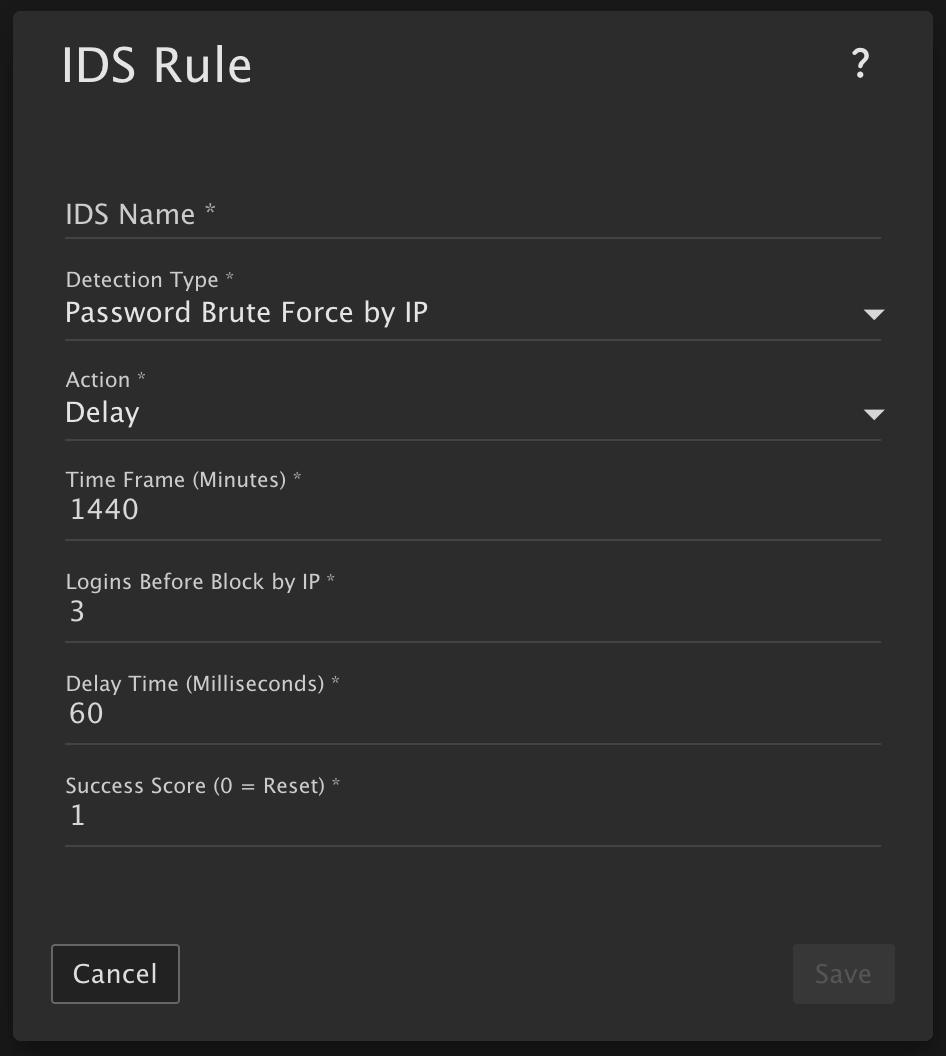
Delay Option
Previously, the only option was to outright block authentication failures. (This behavior will still be preserved for any existing rules after the upgrade.) Administrators can now choose to briefly delay the server’s response to unauthenticated protocol requests instead. As long as the rule’s triggering conditions remain in effect, responses will continue to be delayed.
The delay value is configured in milliseconds and includes safeguards, such as requiring a value between 1 and 5000. Lower values are recommended because, although the authentication attempt is delayed, the connection itself remains open. Keeping connections open for extended periods can increase exposure to DDoS-style attacks.
IDS Rule Impacted: Password Brute Force by IP
Successful Authentication Score
This setting gives administrators greater control over how IDS counters (“ticks”) are handled when a successful authentication occurs. Currently, SmarterMail uses a “Failed Authentication Score” that increments whenever an authentication attempt fails or when features such as “Forgot Password” or password reset are used.
The new configurable “Successful Authentication Score” makes the total score dynamic. Scores can now increment or decrement based on authentication success or failure, adding more flexibility to IDS rules. To prevent abuse, successful authentications are only counted for IDS purposes once every 5 minutes for a specific user/IP combination. This prevents repeated successful logins from continually offsetting failed attempts.
Setting this field to 0 resets the counter back to 0 whenever a successful authentication occurs, which reflects the behavior prior to this enhancement. Any existing rules created before this change will automatically retain a value of 0.
Administrators can configure other values as needed (e.g, 1, 2, 3, or higher) though lower values are generally recommended. For example:
- A value of 2 means one successful authentication offsets two failed authentication attempts from the same IP within the configured timeframe.
- A value of 5 means one successful authentication offsets five failed attempts.
IDS Rules Impacted: Password Brute Force by IP and Password Retrieval Brute Force
Rule Stacking and Escalation
While not entirely new, these enhancements make rule stacking significantly more powerful. Layered IDS rules provide deeper protection against attack patterns that may otherwise evade detection.
Rule stacking involves creating multiple IDS rules of the same type that overlap and work together to provide escalating protection.
For example, consider a Password Brute Force by IP rule configured to block an IP after 25 failed authentications within 10 minutes. An attacker could intentionally stay below that threshold by attempting 24 logins, waiting 10 minutes, and repeating the process indefinitely. This attack pattern would never trigger the rule and could go unnoticed unless logs were manually reviewed.
Adding a second Password Brute Force by IP rule, for example one that triggers after 50 failed attempts within 30 minutes, would catch this behavior. Using the same pattern, the attacker would accumulate 48 failed attempts in just over 10 minutes and would be blocked shortly afterward.
Layered rules can also be used to implement escalating penalties for repeat offenders. For example:
- Rule 1 blocks an IP for 30 minutes after 25 failed authentications within 10 minutes.
- Rule 2 blocks an IP for 2 days after 60 failed authentications within 2 hours.
In this scenario:
- The attacker triggers Rule 1 after 25 failures and receives a 30-minute block.
- Once the block expires, Rule 1 resets, but Rule 2 still retains the previous failures.
- After another 25 failures, Rule 1 triggers again with another 30-minute block.
- Rule 2 now has a total count of 50 failures.
- Ten additional failures would then trigger Rule 2, resulting in a 2-day block.
If multiple layered rules are triggered simultaneously, SmarterMail will enforce the rule with the longest block duration. If multiple rules share the same block duration, the rule with the highest connection threshold will be enforced.
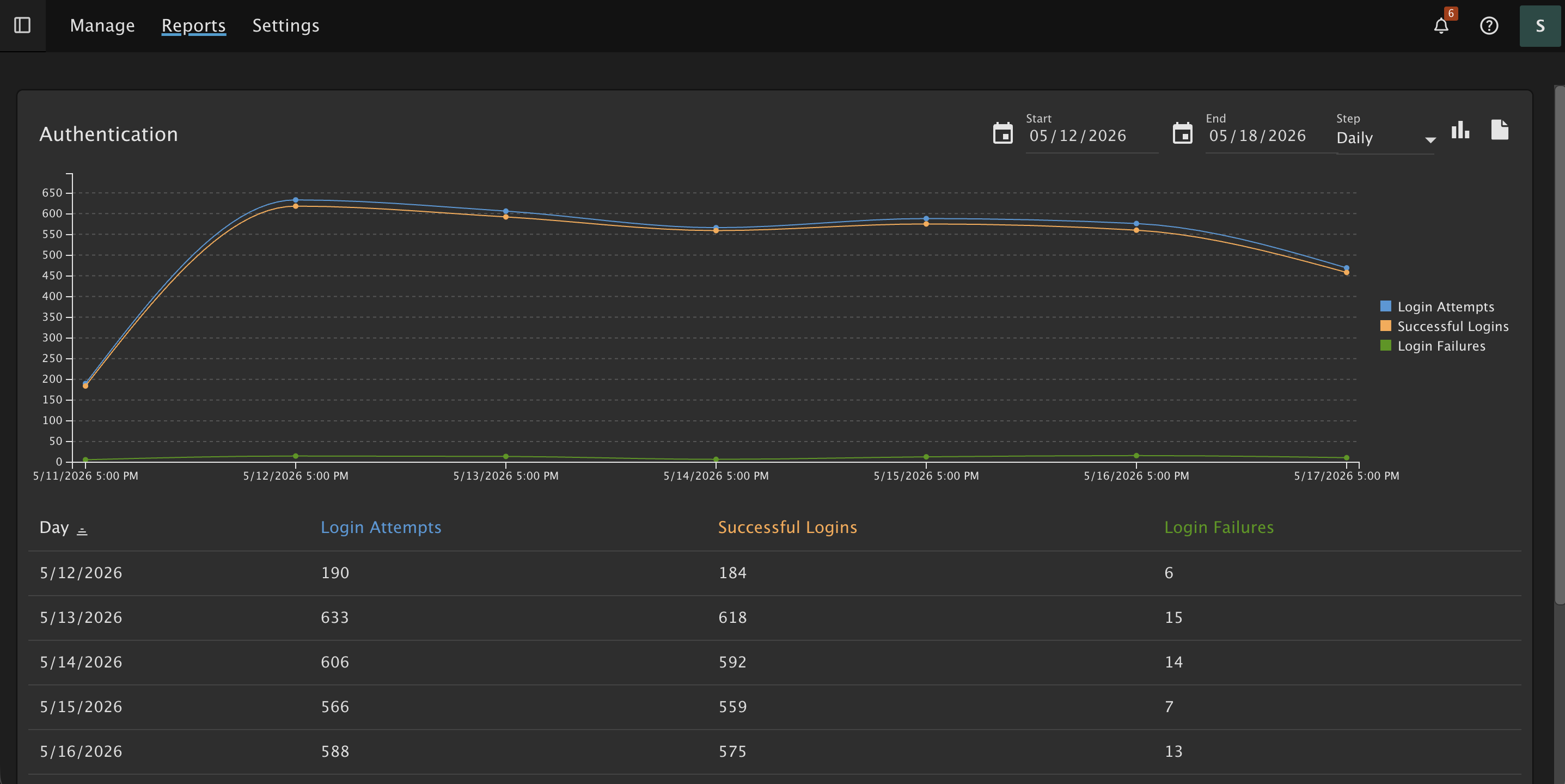
New Authentication Report
Finally, a new Authentication Report has been added that tracks total login attempts and displays both successful and failed authentications across all protocols.
This report helps administrators identify potential attacks by exposing abnormal spikes in failed login attempts or noticeable increases over time.
Failed login attempts through EAS, MAPI, EWS, and WebDAV are always counted. Refreshing the webmail interface is not counted as either a successful or failed authentication; only initial login attempts are included in the report.